• Home
  • Features
  • Pricing
  • Compare
  • Contact
EN

POS, kitchen display and back office for cafés and restaurants

Problems and fixes

Which problem costs you the most?

The problem

Delivery apps keep almost a third of every order.

In France, Uber Eats takes 30% before tax on its default plan, 33–36% in real cost.

Before

Order on a platform: 30% goes in commission.

With Epidom

Order on your link: no platform commission.

How Epidom fixes itPOS
  • ✓Your own ordering page, under your name
  • ✓Customers pay at your counter, so nothing goes to a platform
  • ✓No commission per order, only payment fees
Calculate my commissions
Epidom 3

Three spaces.
One set of data.

A price you change reaches the till and your storefront, and every sale lands in your reports. Nobody types the same thing twice.

Storefront
Free
For your customers
Your menu page and its QR code
Online ordering, paid at the counter (POS plan)
A Google Reviews button
Visits and taps, counted
POS Mode
POS plan
For the counter
The till and the order queue
Kitchen and bar display
Customer screen and printers
Tables, the shift and clock-in
Back Office
Grows with your plan
For running the business
Menu, stock, recipes and suppliers
Customers, staff and schedules
Shifts, finance and every outlet
Storefront, fees, taxes and settings
POS Mode, up close

The till your team works on

Real Epidom screens, not mockups. Pick a view.

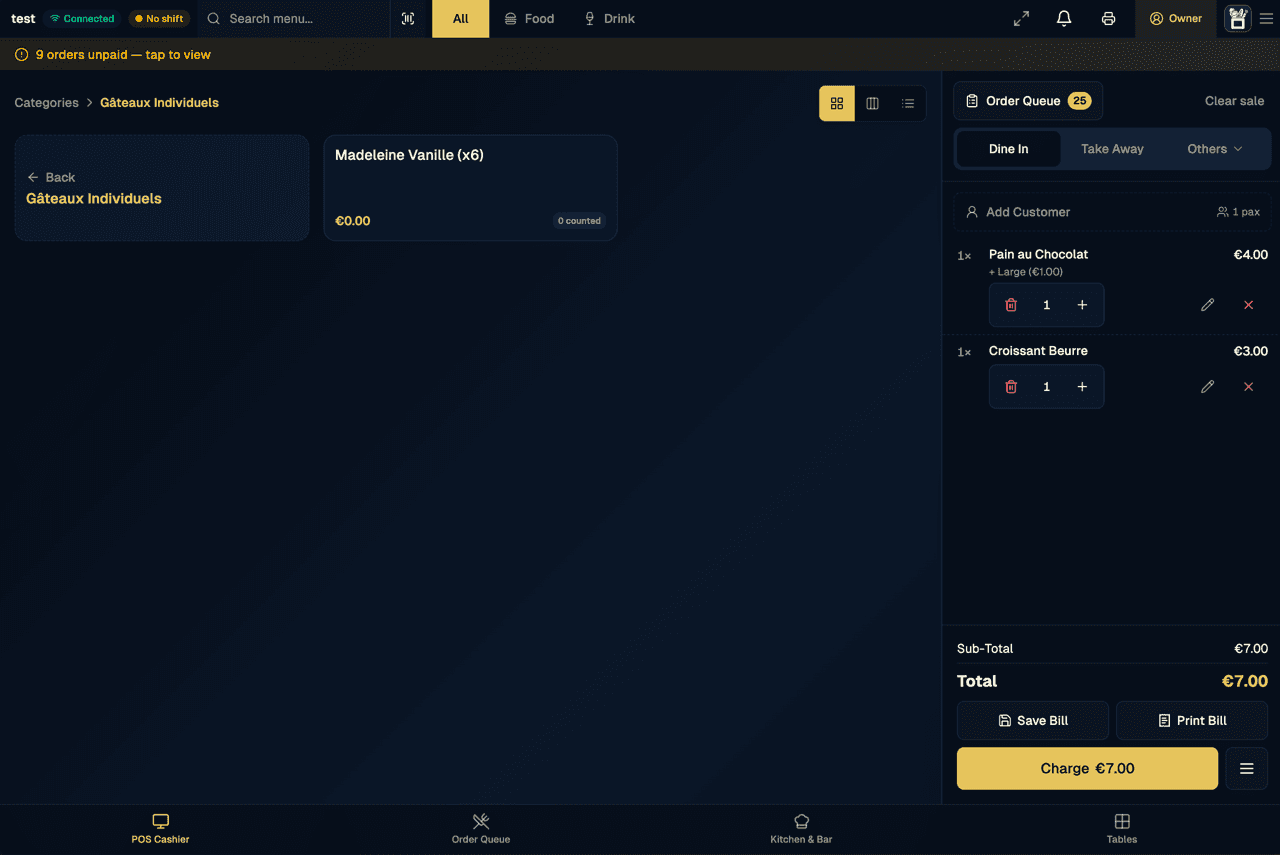
Epidom's POS cashier: a menu category on the left and, on the right, the current dine-in bill with a pain au chocolat and a croissant, a €7.00 total, and Save Bill, Print Bill and Charge buttons.
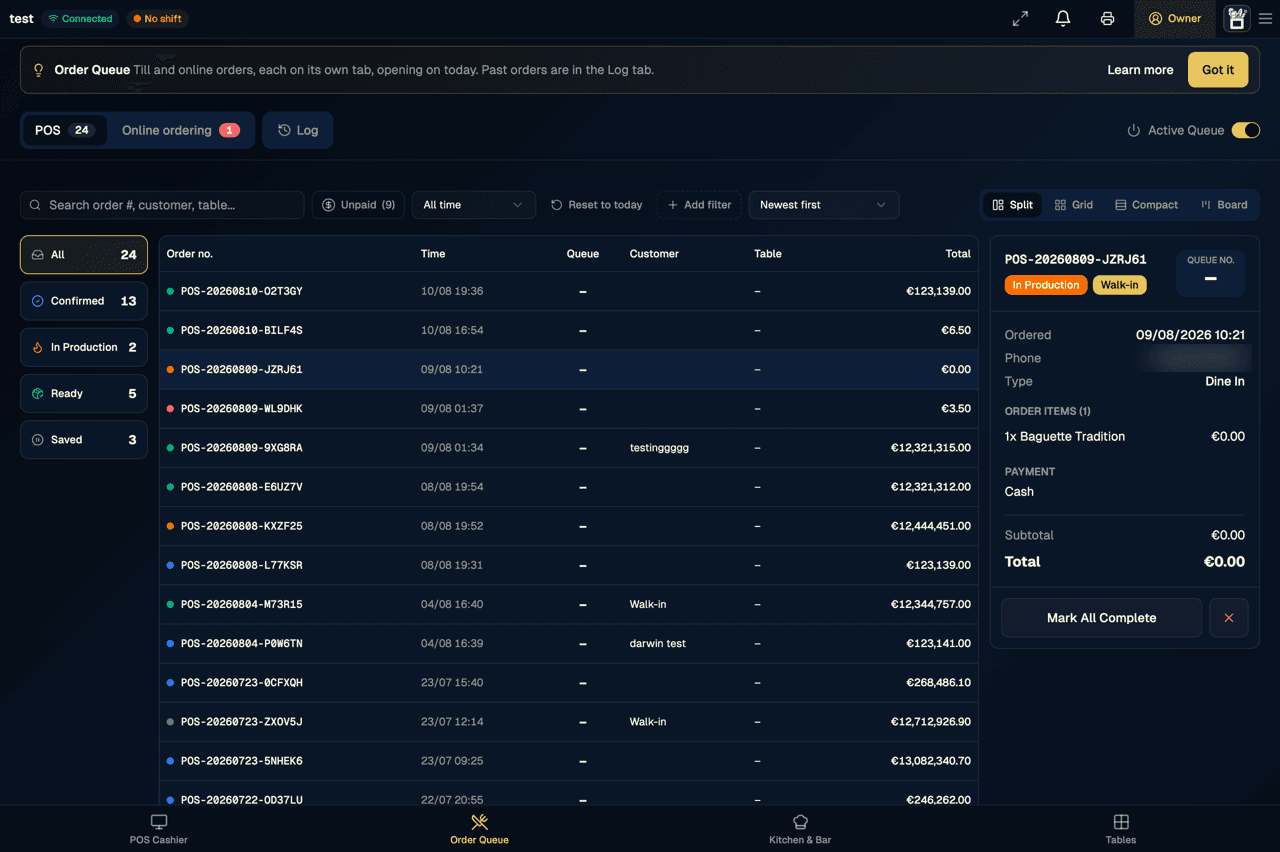
The order queue: till orders by number and time, filters for confirmed, in production, ready and saved orders, and one order's details on the right.
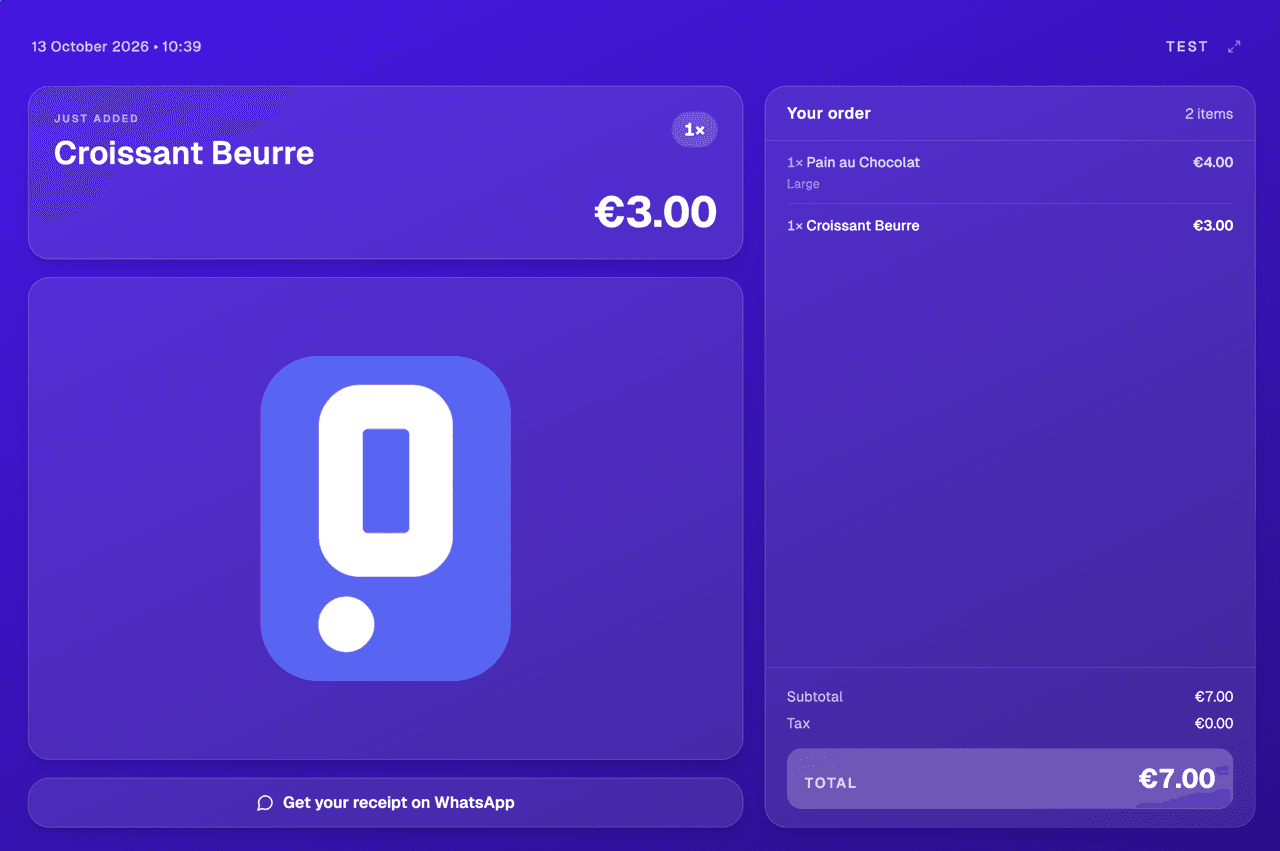
The customer screen: the item just added (a croissant, €3.00), the order with its €7.00 total, and a button to get the receipt on WhatsApp.
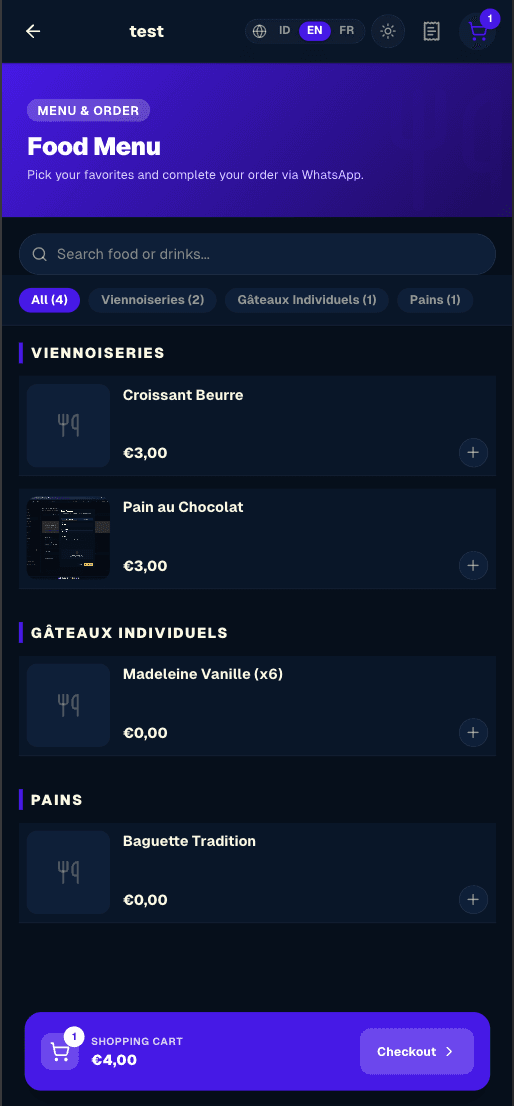
A storefront menu on a phone: categories, items with their prices and an add button, and the cart at the bottom.
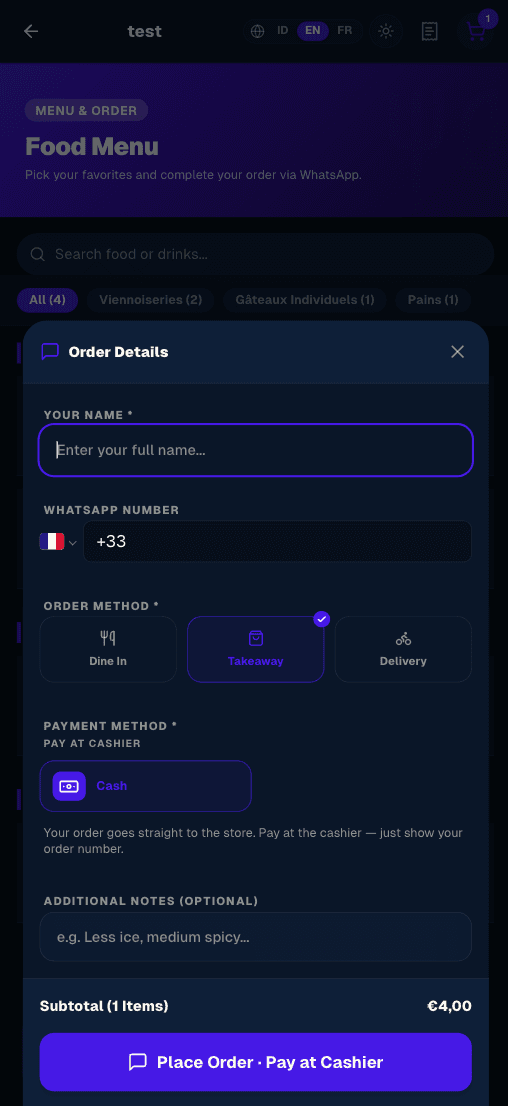
Ordering from a phone: name, WhatsApp number, dine in, takeaway or delivery, pay at the cashier, and the button to place the order.

Tap items onto the bill, choose dine in or take away, then save it, print it or charge it.

01 · Storefront
Free

Your bio link, now a real menu page.

A branded page with your logo, cover photo, opening hours, categories and items. Customers open it in their browser, with nothing to install. Put the link in your bio and the QR code on your tables.

Your own address: epidom.fr/@your-shop
A free QR code to download and print
A “Review us on Google” button, with its own QR code
Visits, item views, WhatsApp and review taps, counted
9:41••••
YOUR CAFÉ
Specialty coffee · Your city
Coffee
Tea
Pastry
Snacks
Vanilla Latte
Single origin · oat option
$4.50
+
Iced Matcha
Ceremonial grade
$5.00
+
Croffle Original
House butter · maple
$3.50
+
Choco Cookie
Dark chocolate 70%
$2.80
+
2 items
$8.00
Order →
02 · Orders & payments
POS plan

Online orders land in the till's queue.

Customers order from your storefront for dine-in, take-away or delivery, and pay at the counter. The order appears on the till straight away with its queue number, marked unpaid, and the customer follows it on their phone.

Dine-in with a table number, take-away or delivery
Paid at the counter: the cashier takes the payment and marks the order paid
Queue numbers, #1, #2, #3, that start again every morning
Delivery-app orders keyed in at the till, each app on its own report line
Checkout · simulated
Jordan · online order
$11.60 · paid by card
Paid ✓
Lands on the till · Online tab#12
03 · The till
POS plan

A till that keeps up with the queue.

The bill builds itself like a receipt as you tap. Save it for later, split it, merge it, or take one payment several ways. Food and Drink tabs and category cards get the cashier to the right item fast.

Save, split and merge bills, or pay one bill several ways
Discount presets, coupons and loyalty points (Operations plan)
Receipts printed, sent by email or on WhatsApp
Keeps selling offline and syncs when you're back online
Till · simulated
Table 4 · 2 guests · Dine in#12
2 × Latte$9.00
1 × Croissant$3.25
1 × Avocado toast$10.50
Subtotal$22.75
Coupon WELCOME · −10%−$2.28
Total$20.47
Save Bill
Split
Charge $20.47
All sales synced
04 · Customers & loyalty
POS plan · points on Operations

Know your regulars by their WhatsApp number.

On a second screen facing the counter, customers type their WhatsApp number. A regular is greeted by name and added to the sale; someone new can leave a name and email. Once the order is paid, the receipt goes to their email on its own.

A customer screen on a second monitor plugged into the till
Points, lifetime spend and orders for every customer
See whether each receipt went out, and resend it
Export your customer list to CSV
Customer screen · simulated
Your WhatsApp number
+1 415 ••• 0142
Welcome back, Sam!
320 points14 visits$212 spent
Receipt sent to their email addressSent ✓
05 · Kitchen, bar & printers
POS plan

Order in front, kitchen in back.

Each item reaches the kitchen or bar display the moment the order is placed, with a timer that turns urgent while it waits. Pair up to four Bluetooth printers: receipts, kitchen tickets, bar tickets and item labels.

Separate Kitchen and Bar screens, marked ready item by item
Kitchen and bar tickets in large type, with no prices
58 mm or 80 mm paper, and a test print for each printer
Bluetooth printing from Chrome on Android or a computer; on iPad, the print dialog
9:41● live
Kitchen · 3 active
Tickets
#104202:14
• 1 × Latte
• 1 × Croffle
Table 4
#104104:50
• 1 × Matcha
• 1 × Cookie
IG link · Sam
#104006:32
• 2 × Espresso
Walk-in
Mark next ticket ready →
06 · Staff, schedules & shifts
Operations plan · shift on POS

One shift for the whole store.

Plan the week on a grid, or upload a photo of your roster for the team. Staff clock in with a selfie and their location. Every cashier and device shares the store's shift, and closing it means a blind cash count against what the drawer should hold.

Roster grid or roster photo, on every staff member's My Schedule
Clock in with a selfie and location, overtime worked out
Shift report on paper or by link, and a shift history
Staff sign in with their own account, or a PIN on a shared tablet
End of shift · simulated
Finish shift
Opened 07:58 by Maria
Opening Cash$150.00
Cash Sales$412.60
Cash in / out−$20.00
Expected Cash$542.60
Counted$542.60
Difference · $0.00Balanced ✓
Clocked in with a selfieMMaria · 07:52TTom · 08:03
07 · Stock, recipes & suppliers
Operations plan

A recipe is a margin calculation in disguise.

Build a recipe from your ingredients and Epidom works out its cost per portion and your margin. Sales take what they use out of stock, and every change is written to the stock log.

Cost per portion and margin for every recipe
Stock taken out automatically as you sell
A log of every change: sales, deliveries, production, waste
Supplier orders sent by email or printed, received in one tap
Recipe
Avocado toast
$3.05
cost / portion
Sourdough2 slices$0.60
Avocado1$1.40
Feta30 g$0.55
Egg1$0.35
Chili & lemon5 g$0.15
Sells for $10.50 · margin 71%+$7.45
Sample recipe
08 · Reports & finance
Shift report on POS · Finance on Operations

Reports that explain themselves.

Every shift ends with a report you can print or share by link. Finance adds revenue, cost of goods, waste and profit for any dates, sales by channel after each platform's commission, and all your outlets side by side.

Cash expected, counted and the difference, shift by shift
Revenue, COGS, margin and waste for any date range
Sales by channel, net of platform commission
Print it or export it to Excel
Finance · May 2026
Gross Margin · 66.2%
+2.1 pts
vs. April
Revenue$52,400
COGS−$17,710
Waste & loss−$590
Net Profit$34,100
Print or export to Excel · sample figures
And also

The details that save a shift.

Works offline
POS

Sales made without a connection stay on the device and sync when it's back.

Tables & reservations
POS

Your tables with their seats and status, linked to each order, plus reservations.

Several stores
Operations (up to 3) · Enterprise (4+)

One login for all your stores, and switch between them from the till.

Production & prep
Operations

Plan production batches, log today's prep in one tap and count what's left at closing.

Smart Import
Operations

Bring your products and ingredients in from a spreadsheet.

A second product line
Operations

Sell something outside your menu, like retail, without it going to the kitchen.

Three languages
All plans

Every screen in French, Indonesian and English, with dark mode and zoom.

Activity log
All plans

See every change made on your account, and get an email if support makes one.

It plays nice

The tools you already use.
No new vocabulary.

Stripe
Visa
Mastercard
Apple Pay
Google Pay
WhatsApp
Google Reviews
ESC/POS Printer
Start free, forever

Ready to set up
your café page?

free forever. quick setup. no card.

Free foreverQuick setupNo app downloadEncrypted data

Stay in the loop

Tips & updates for your coffee shop. No spam.

F&B Platform — Free, Complete, Fast

Product

  • Home
  • Features
  • Pricing
  • Compare
  • Contact
  • Docs & Help
  • Changelog

Guides & tools

  • Recipe cost calculator
  • Delivery commission calculator
  • Free QR code menu
  • Commission-free online ordering
  • Cafe POS system
  • Bakery POS system
  • Offline POS
  • Kitchen display system
  • Restaurant inventory
  • Staff scheduling
  • Receipt printers

Company

  • About
  • Blog
  • Careers
  • Press
  • Partners
  • Build your app

Legal

  • Terms of Service
  • Privacy Policy
  • Refund Policy
  • Cookie Policy
  • GDPR

Contact us

  • cro@prionation.io, ceo@prionation.io, consult@prionation.io
  • WhatsApp (France)
  • WhatsApp (Indonesia)
  • Canggu, Bali
  • Meet us
Infrastructured byPRIONATION.io
© 2026 Epidom. All rights reserved.v3.38.1
Terms of ServicePrivacy PolicyRefund Policyepidom.fr
FrançaisIndonesiaEnglish